
PDF Prep

The right pages.
One ready PDF.

Combine PDFs and photos, put the pages in order, and inspect a new PDF against your chosen upload size limit.

Stable · 1.0.1Free · Windows & Linux · x64
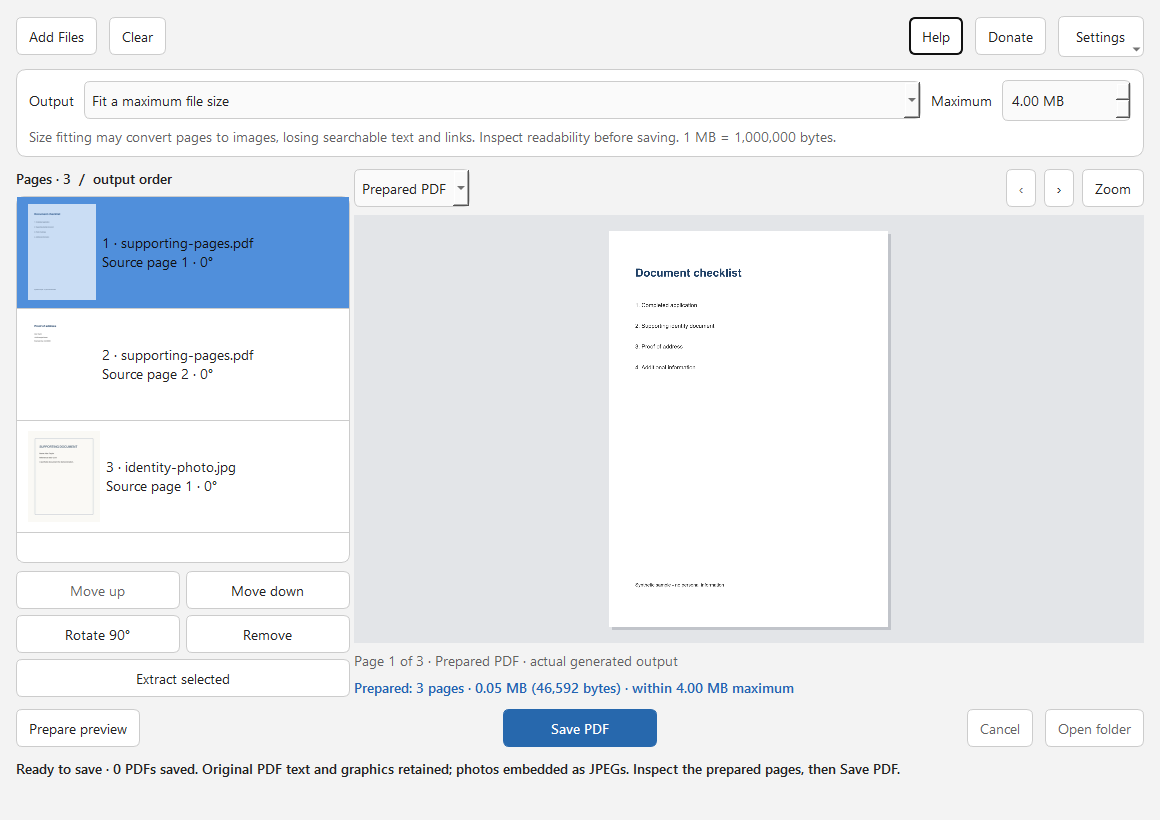
PDF Prep showing a synthetic document page list, visible file-size settings and a generated PDF preview.
Actual source-build interface with synthetic demonstration documents, showing a prepared 3-page PDF under a 4 MB limit. No personal documents are pictured.

A clear path to the result

Arrange. Inspect. Save a new PDF.

Prepare one document from PDFs, JPEGs and PNGs. Arrange and rotate pages, choose the pages to include, then preview the generated PDF and its actual file size before saving.

  1. Bring the pages together.

    Add PDF, JPEG or PNG files. Each page keeps its source filename in the list, so you can see where it came from.

  2. Put the document in order.

    Move pages, rotate them, remove pages from the plan, or prepare only selected pages. Set a maximum file size when an upload needs one.

  3. Inspect the generated result.

    Prepare the preview to see the actual output pages and file size. Check readability, then save a new PDF. If the size limit cannot be met, change the limit or use the original-quality option.

The practical details

What it does.

Inputs
PDF documents, JPEG photos and PNG images
Page plan
Thumbnails, source filenames, reorder, rotate, remove and selected-page extraction
Size
Optional maximum file size in decimal MB (1 MB = 1,000,000 bytes), with an actual generated-result size
Inspection
Preview the generated PDF before saving
Output
One new PDF; existing files are never replaced
Processing
Local and offline; no document uploads or accounts

Know before you start

Keep the limits in view.

  • When compression is needed to reach a size limit, pages become JPEG images. Searchable and selectable text, links and layers are not preserved in that output. Check every page for readability.
  • A size limit cannot always be met acceptably. An output that remains above the chosen limit cannot be saved until you change the plan or limit.
  • Encrypted or malformed PDFs, interactive forms and signed PDFs are refused. Export a flattened, unsigned copy first when appropriate. This is not a PDF form editor, OCR tool or redaction tool.
  • Original-quality assembly preserves PDF page content and searchable text where possible. Document-level features such as portfolios, attachments, bookmarks and metadata are outside this version’s scope; it is not an archival rewrite.
  • Inputs are limited to 256 MiB per file, 512 MiB of combined source files, 1,000 pages per job and 40 megapixels per image. These input limits use binary MiB; output limits use decimal MB. Animated PNGs and PDFs with invalid or extreme page dimensions are unsupported. Large documents can use significant time and memory.
  • Saved PDFs may contain personal information visible in the source pages. Combining or compressing a document does not redact it.
  • Windows and Linux x64 packages are available. Wider distribution, desktop, hardware, screen-reader and human-usability coverage remains unverified. No macOS or ARM package is provided.

Get PDF Prep

A small tool.
Ready when you are.

Every feature is free. Donations are optional and do not unlock features. Choose a package for your computer and read its setup notes.

Stable 1.0.1. Unsigned x64 packages. Python is bundled. Linux is available as an AppImage or a portable tar.gz. No macOS package is provided.

Windows

Portable ZIP · x64

  1. Download the ZIP and compare its SHA-256 below.
  2. Extract the entire ZIP and open PDF-Prep/PDF-Prep.exe. Keep the _internal folder and other bundled files beside it.
  3. Python is bundled. Check a small synthetic document before preparing important files.

This package is unsigned. Windows may show an unfamiliar-publisher warning. Check the published checksum and source before deciding to run it.

Release checks
  • Automated release and packaged workflow checks passed for this exact Windows x64 ZIP.
  • Interactive Windows desktop acceptance has not been recorded for this package.
  • Wider hardware, display and assistive-technology coverage remains unverified.
Download for Windows

SHA-256
e710b16a4b837ab1e55f1da4bb3b1bfdac926d5f1d2deb27a84f7943d7881eec

Linux

AppImage · x64

  1. Download the AppImage and compare its SHA-256 below.
  2. Make PDF-Prep-x86_64.AppImage executable in your file manager, then open it. Python is bundled.
  3. Without FUSE, use APPIMAGE_EXTRACT_AND_RUN=1 ./PDF-Prep-x86_64.AppImage, or choose the portable archive below. Both alternatives keep Python bundled.
  4. Read README-LINUX.txt and LINUX-SYSTEM-DEPENDENCIES.json inside the application for desktop-library prerequisites, or choose the portable archive below.

A graphical desktop and compatible system libraries are required. Built on Ubuntu 22.04; wider distribution compatibility is not established. Saving requires a destination filesystem that supports hard links; unsupported filesystems fail without replacing an existing file.

Release checks
  • Automated release and packaged workflow checks passed for this exact Linux x64 AppImage.
  • Interactive VirtualBox Linux desktop acceptance has not been recorded for this package.
  • Wider hardware, display and assistive-technology coverage remains unverified.
Download AppImage

SHA-256
333f16047f4c67df2b5f5fcd7ca7febae3d62bfc98d2e244316b1b05582d83de

Linux

Portable tar.gz · x64

  1. Download the tar.gz archive and compare its SHA-256 below.
  2. Extract the complete archive and open PDF-Prep/PDF-Prep. Keep the _internal directory and other bundled files beside it. Python is bundled.
  3. This archive does not need FUSE. A graphical desktop and standard desktop libraries are still required; read README-LINUX.txt and LINUX-SYSTEM-DEPENDENCIES.json in the extracted folder.

A graphical desktop and compatible system libraries are required. Built on Ubuntu 22.04; wider distribution compatibility is not established. Saving requires a destination filesystem that supports hard links; unsupported filesystems fail without replacing an existing file.

Release checks
  • Automated release and packaged workflow checks passed for this exact Linux x64 portable archive.
  • Interactive VirtualBox Linux desktop acceptance has not been recorded for this package.
  • Wider hardware, display and assistive-technology coverage remains unverified.
Download portable archive

SHA-256
7847779f3eee112f1b0dc71f7aa7a85647ffe0913e1b61d239c8f9f69234e4c4

Release notes & checksums   ·   Source code

How to check a download

A SHA-256 checksum helps confirm that your downloaded file matches the published release. It is not a code signature or a guarantee of safety. Compare the complete value before running the app.

In Windows PowerShell, run Get-FileHash -Algorithm SHA256 "path-to-downloaded-file". On Linux, use sha256sum "path-to-downloaded-file". Replace the quoted text with the actual file path.

A few useful answers

Before your first run.

What happens to my files and settings?

PDF Prep imports, previews, assembles and compresses documents locally. It does not upload your PDFs or photos, collect app telemetry, or require an account.

Saving creates a new PDF and refuses existing destinations. Your original files stay unchanged. Page removal changes only the output plan, not the source document.

Appearance and the last maximum-size choice are stored on your computer; document contents and recent paths are not saved as preferences. Source filenames and document contents appear in the app and may appear in screenshots or exported PDFs. Review them before sharing.

The optional Donate button opens the studio’s external Ko-fi page. Donations are never required to use a feature.

Read the studio privacy details.

Is every feature free?

Yes. There is no paid feature tier or required donation. Supporting the studio is optional.

How do I report a problem?

Use the PDF Prep issue tracker. Include the app version, operating system, steps, and a small synthetic example. Public issues are visible to anyone: remove personal filenames, folder paths and other private details.